
How Do You Clean and Maintain Smart Glass Safely?
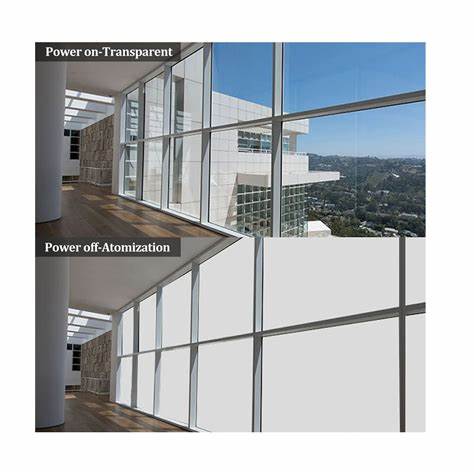
Smart glass should be cleaned like a precision electrical glazing system, not like an ordinary mirror. The safest routine is simple: switch off the power, let the surface cool, remove loose dust with a clean microfiber cloth, and use only a small amount of an approved neutral cleaner on the cloth. Keep liquid away from the edges, seals, busbars, wiring and transformer connections. Restore power only after the glass is completely dry.
This guide covers PDLC Smart Film, laminated Smart Switchable Glass and retrofit film. The correct method depends on which product you have and whether you are wiping the exposed glass surface or the film side. If your installer supplied a product-specific care sheet, it takes priority over any general advice.
Start by Identifying Your Smart Glass
Self-Adhesive PDLC Film is a peel-and-stick retrofit product for existing glass. PDLC Smart Film for Lamination Glass is a non-adhesive film processed inside a laminated panel. Smart Glass (Switchable Privacy Glass) places PDLC film between two glass panes. In the laminated construction, the film is protected from direct contact; in a retrofit installation, the film edge and electrical connection need extra care.
For a retrofit window, confirm which side is the exposed film before applying any liquid. For laminated smart glass, clean the glass as instructed, but still prevent water from standing at the perimeter. Never assume that a cleaner safe for one construction is safe for another.
Safe Cleaning: A Practical Seven-Step Method
1. Switch off and isolate the power
Turn off the wall switch or controller, and isolate the circuit when the installation or site procedure requires it. Do not clean a wet-area panel while it is energised. The laminated Smart Glass and lamination film specifications on this product range use AC 48-65 V and AC 36 V systems respectively. That is low compared with mains power, but the installation still contains powered electrical connections. Do not touch wiring, busbars or a transformer with wet hands.
2. Let the glass cool
Do not clean a sun-heated panel. A hot surface can dry cleaner too quickly and leave marks, while sudden temperature changes can stress glass and seals. Work when the surface is cool and out of direct sunlight.
3. Remove dry particles first
Use a clean, dry, lint-free microfiber cloth. Wipe from top to bottom with light pressure. Removing dust first prevents grit from being dragged across the surface and creating fine scratches.
4. Put the cleaner on the cloth, never at the edge
Use distilled or clean water where permitted, or a pH-neutral, non-abrasive cleaner approved for the product. Lightly dampen the cloth; do not soak it. Never spray liquid directly toward the frame, laminate edge, busbar, cable outlet or seal. For a self-adhesive film, follow the film-side instruction from your installer before using any liquid.
5. Wipe gently in overlapping passes
Use straight, overlapping strokes or very light circular motions. Do not scrub one spot aggressively. Change to a clean area of the cloth when it becomes dirty. Avoid paper towels, rough sponges, squeegees with worn blades and any tool that contains metal.
6. Dry the glass, frame and perimeter
Use a second lint-free cloth to remove remaining moisture. Pay special attention to the bottom edge, corners and frame channels. Water should never pool near electrical interfaces. Do not use compressed air to force moisture into the edge.
7. Wait before restoring power
Allow the surface and perimeter to dry fully. Then restore power and test the clear-to-frosted transition. The laminated glass specification lists switching in less than 0.2 seconds; the lamination film is listed at approximately 10 ms from OFF to ON and 100 ms from ON to OFF. A delayed or uneven response after cleaning is a reason to stop testing and contact the installer.
What Should You Use - and What Should You Avoid?
Recommended equipment:
- Clean microfiber or lint-free cloths
- Distilled water where the product manual permits it
- A mild, pH-neutral, non-abrasive cleaner
- Soft gloves for handling removable panels or film edges
- A separate dry cloth for final buffing
Avoid:
- Ammonia, bleach, acetone and strong solvents
- Acid-based or abrasive cleaners
- Steel wool, scouring pads and razor blades
- Steam cleaners and pressure washers
- Direct spray onto the film, edge or frame
- Silicone products that are not approved for the installation
Vinegar is not a universal solution. It may help with mineral marks on some glass surfaces, but acid can be unsuitable for a coating, frame or film edge. Use it only when the product manufacturer has approved it and only after a small test area.
Maintenance by Product Type
Self-Adhesive PDLC Film
The self-adhesive PDLC film listed for retrofit applications has a stated indoor service life of more than 50,000 hours. Its typical specification includes approximately 84% visible light transmission in the ON state, approximately 5% in the OFF state, AC 60 V operation and an operating range of -20 to +70 degrees C. These figures describe the product under specified conditions; they do not replace installation and maintenance requirements.
Keep the film edge dry and never peel, lift or press the film. Clean the exposed glass side with the approved method. If the film side is accessible, use the film manufacturer's dry-cloth instruction unless E&N or the installer confirms a compatible liquid.
PDLC Film for Lamination Glass
The lamination film is a non-adhesive product processed into laminated glass. Its typical specification is AC 36 V, approximately 3 W/m2, more than 99% UV blocking in the OFF state, and a service life of more than five years under stated indoor conditions. The finished panel should be cleaned from the glass surface, while moisture must be kept away from the perimeter and electrical connection.
Laminated Smart Switchable Glass
Laminated Smart Glass integrates PDLC film between two glass panes. The typical specification includes up to 90% transparency when powered, more than 95% haze when off, 4-5 W/m2 power consumption, more than 99% UV blocking and switching in less than 0.2 seconds. The laminated structure protects the film, but it does not make the edges waterproof. Routine cleaning should therefore include an inspection of seals, frame channels and wiring.
A Maintenance Schedule That Prevents Expensive Problems
After installation: remove construction dust only with the installer-approved method. Protect the panel from paint, adhesive, cement, grinding dust and welding sparks.
Weekly or as needed: remove fingerprints, dust and water marks before they harden.
Monthly: test switching across the entire panel. Look for uneven haze, local dark spots, bubbles, discoloration or a loose edge.
Every three to six months: inspect frames, seals and drainage paths, especially in bathrooms, hotels and coastal environments.
Annually: have a qualified technician inspect exposed wiring, the transformer, control system and edge connections. Record the inspection date and any change in switching performance.
Common Problems and the Correct Response
If the panel will not switch, do not keep cycling the power. Check that the controller and transformer are operating, then contact the installer if the fault remains. If only one area stays cloudy, the issue may involve the busbar, wiring or film - not surface dirt. Bubbles, edge whitening, delamination or moisture inside the perimeter should be documented with photos and reported promptly. Cutting, peeling or re-sealing the film without technical approval can make the problem worse and may affect warranty coverage.
Frequently Asked Questions
Can I use ordinary window cleaner? Only if it is pH-neutral, non-abrasive and approved for your exact construction. Household glass cleaner is not automatically safe for PDLC film or its edges.
Can I clean smart glass while it is powered? No. Switch it off first, keep electrical connections dry and restore power only after the panel is completely dry.
How often should PDLC Smart Film be cleaned? Clean when fingerprints, dust or water marks appear. A light weekly wipe is usually safer than infrequent aggressive scrubbing.
How long does PDLC Smart Film last? The product specifications referenced here list more than 50,000 indoor service hours for self-adhesive film and more than five years for lamination film under stated conditions. Actual life depends on installation, environment, voltage and maintenance.
How to Choose a Smart Glass Solution That Is Easier to Maintain
Ask four questions before purchasing:
1. Is the product self-adhesive, laminated film or complete laminated Smart Glass?
2. Which surfaces may be cleaned with water, neutral cleaner or IPA?
3. What are the rated service life, operating voltage, power consumption and warranty conditions?
4. Who supports the transformer, wiring, glass and film if a fault occurs?
For retrofit projects, self-adhesive film can reduce installation work. For new glazing or high-traffic commercial areas, laminated Smart Glass places the PDLC layer between glass panes and can provide a more protected finished surface. Ask the supplier about customized sizes, wiring positions and control-system integration before finalizing the design.
FAQ
Q1. Can I use alcohol or IPA wipes on Smart Glass?
A: Only use IPA wipes when they are specifically approved for your product. A cleaner that is suitable for one type of PDLC film may damage another type, so always test a small, hidden area first and keep liquid away from the perimeter.
Q2. How do I clean self-adhesive PDLC film differently from laminated Smart Glass?
A: Self-adhesive film requires extra protection around the exposed film edge and electrical connection. Laminated Smart Glass protects the PDLC layer between two glass panes, but the outer glass, seals and edge connections still need gentle cleaning and careful drying.
Q3. How often should PDLC Smart Film be cleaned?
A: Clean the surface whenever fingerprints, dust or water marks appear. A light weekly wipe is usually safer than allowing dirt to build up and then using strong pressure or aggressive chemicals. Test switching monthly and inspect seals and wiring at least once a year.
Q4. Can I use a pressure washer or steam cleaner on Smart Glass?
A: No. High-pressure water and steam can force moisture into seals, film edges and electrical interfaces. Use a soft microfiber cloth and a small amount of approved cleaner instead.
Q5. How should I remove hard water marks or adhesive residue?
A: Start with clean water and a soft cloth. If the mark remains, use only a manufacturer-approved spot cleaner and test it on a small area first. Never use razor blades, steel wool, abrasive pads or strong solvents.
Safety Checklist
Before cleaning, confirm: power off, surface cool, dust removed, cleaner approved, cloth clean, edges protected and no direct spray. After cleaning, confirm: glass dry, frame dry, wiring untouched and switching normal.
If you are specifying PDLC Smart Film or Smart Switchable Glass for a new project, request a sample, technical datasheet and maintenance instructions before placing the order. Contact E&N HONJIA to discuss the correct film, laminated glass construction, power supply and project-specific cleaning requirements.